In this post, I will be going over how to deploy a workload domain in the holodeck lab if you have only deployed the management domain with NSX Edge Cluster configured in it by using VLC GUI
In my lab, I was unsuccessful the first try in getting VLC GUI to deploy the workload management with NSX Edge Cluster in it, so I only deployed the management domain and then configured the workload domain using the SDDC Manager.
First, you will have to use “add_4_big_hosts_ESXi5-8.json” or “add_4_hosts_ESXi5-8.json” using the VLC GUI to provision 4 nested esxi hosts esxi5-esxi8 in the lab env.
Once the hosts are created, you will have to use the commission hosts option under Hosts in SDDC Manager to get the 4 esxi hosts into the SDDC Manager. Once the 4 esxi hosts are unassigned in the SDDC Manager, we will start the creation of the workload domain using the SDDC Manager.
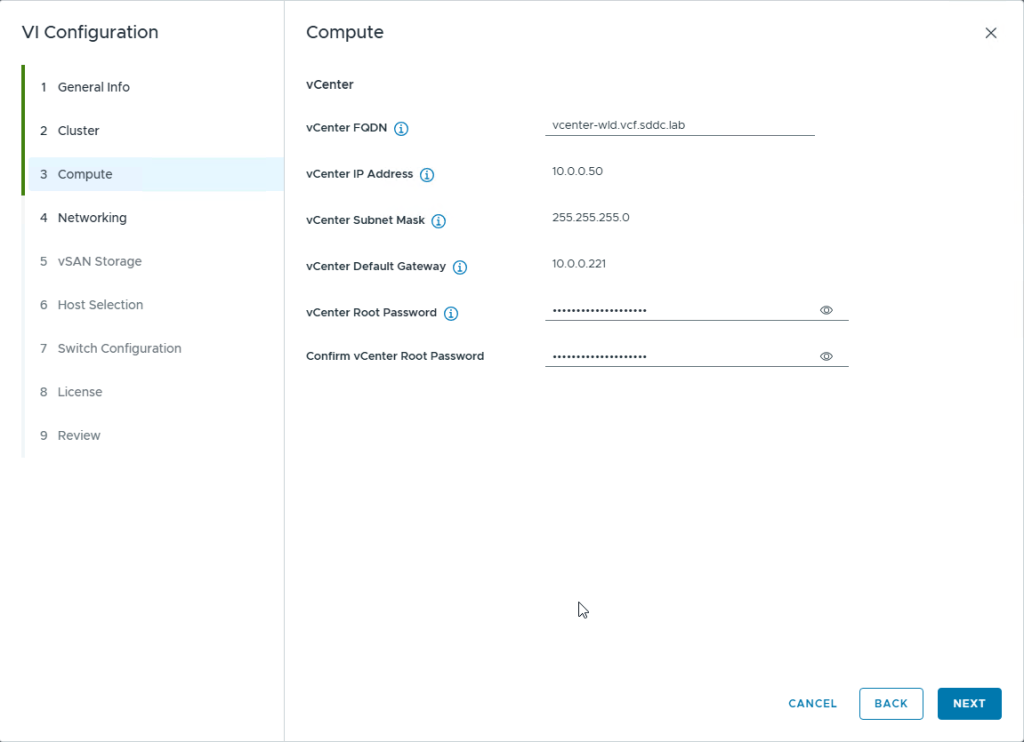
Click on Workload Domains option on the left side, then click on the Workload Domain dropdown option and select the option VI-Workload Domain to start the workload domain creationEnter the information like the domain name, organization name etc and select the SSO domain name, in my case, I selected the option “Join Management SSO Domain”provide the cluster name and click nextProvide the details of the vcenter server to be deployed. These details should already be present in the Holo-Console under C:\VLC\VLC-Holo-Site-1\conf in the “additional_DNS_Entries.txt” fileProvide the network details to deploy the NSX Manager appliance and its Cluster IP.
NOTE: The SDDC Manager will only deploy 1 NSX Manager Appliance nsx1-wld even though you provide the network details for all 3 managers
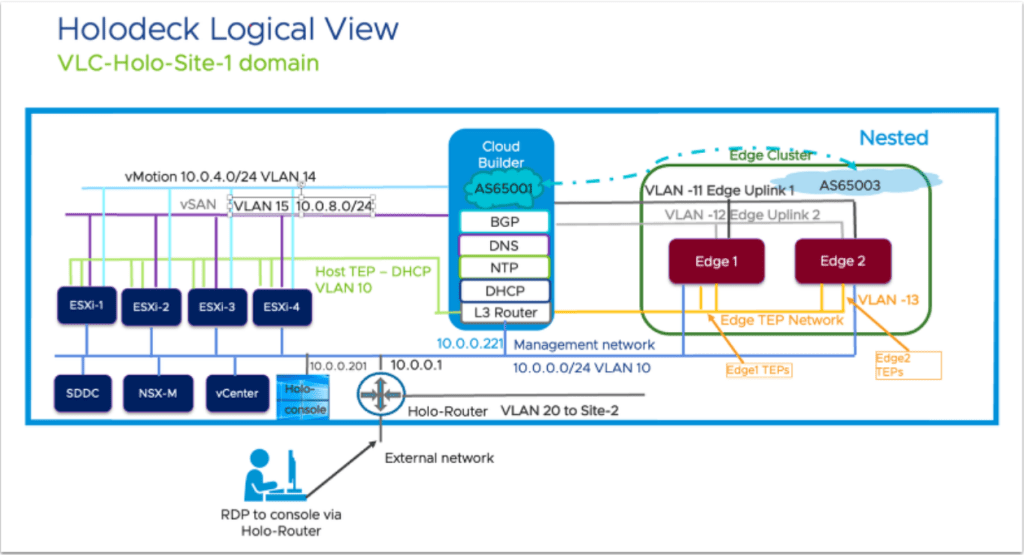
Provide the NSX Credentials as present in the Holodeck Console VM and click Next to continueSelect the amount of failures to tolerate for the VSAN Storage (I have deployed VSAN OSA in this lab), I have also selected VSAN Dedup and Compression for the vsan datastoreselect the esxi hosts (esxi-5 to esxi-8) and click NextUnder the Switch Configuration you can pick between these 3 options, but I picked the NSX Traffic Separation option as I wanted to have a separate dv switch for NSX trafficOnce you select the Switch Configuration Profile, You will need to select the VLAN for Management traffic, click on Edit as the screenshot aboveEnter the VLAN as VLAN 10 as this is the vlan used for Host TEP for DHCP and NSX Overlay according to the holodeck architecture diagram as shown belowClick on Acknowledge for the Next option to appear
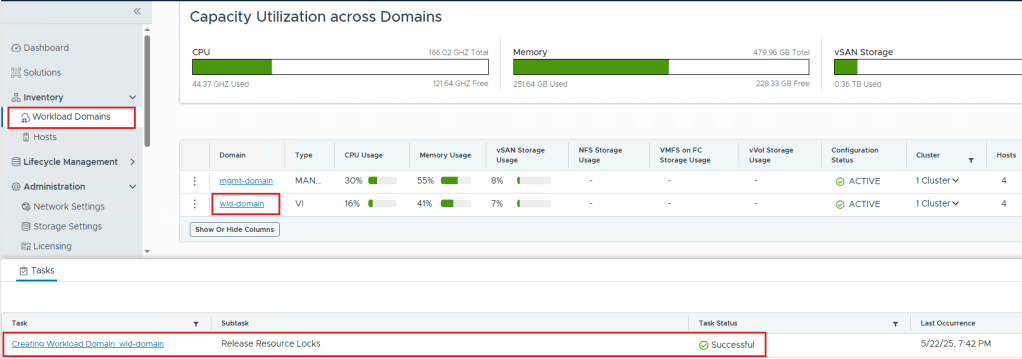
Click Next to ContinueClick on License Later as you can add the licenses later and continueCheck the Summary and click on Finish to Initiate the Workload Domain Creation in SDDC ManagerThis Shows that the workload domain was created and you can confirm that by checking the task as well as going to Workload Domains and checking the workload domain (in my lab the name is wld-domain) is active.






 Hyperconverged Infrastructure & Virtualization
One thought on “Deploying Workload Domain in Holodeck Toolkit 5.2x”