Today, I had to patch an external PSC controllers at a customer site, and here is the process I followed:
- First, take a snapshot of the platform controllers (PSC01 and PSC02)
- Enable SSH on the platform controllers (SSH), I did this by logging in from the DCUI of the PSC appliance and enable SSH
- Use a client like Putty to SSH into PSC01
- Before doing anything, go ahead and mount the iso, in my case it was “VMware-vCenter-Server-Appliance-6.0.0.xxxxx-36xxxxx-patch.iso” to the PSC01 virtual machine
- After logging into the PSC01 using SSH, login to PSC01 and perform the following commands
Command> software-packages stage --iso --acceptEulas- The above command will stage the code in the appliance
- Once the staging is complete, we do the following
Command>software-packages install --staged- This will start the installation of the staged code in the PSC
- we repeat the same steps for PSC01
here is the screen of the commands:
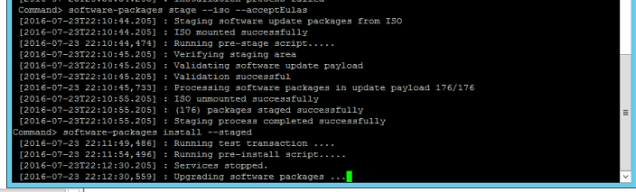
PS: I have observed that the installation process takes quite a while to complete.
Here is the error I have come across when upgrading the PSC:
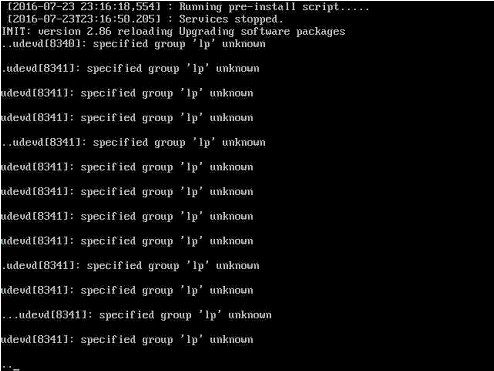
NOTE: I have received an error “specified group ‘Ip’ unknown” while upgrading the PSC and the solution is to enable IPv6 on the PSC before starting the upgrade. This solution was taken from the release notes here
EDIT: I have observed that even if you enable IPv6 on the appliance, you still get the message “Specified group ‘Ip’ unknown”, however the upgrade process fine and completes the upgrade.
EDIT: You could also use the following command if you don’t want to stage the code
Command>software-packages install --iso --acceptEulas
 Hyperconverged Infrastructure & Virtualization