Login into the SDDC Manager, Go to the Workload Domain which you have created (In my case the workload domain name is wld-domain), go to the Edge Clusters tab
Click on Edge Clusters tab
Ignore the Errors in my lab, that’s just license errors in the lab env.
Click on Add Edge Cluster option as in the screenshot below
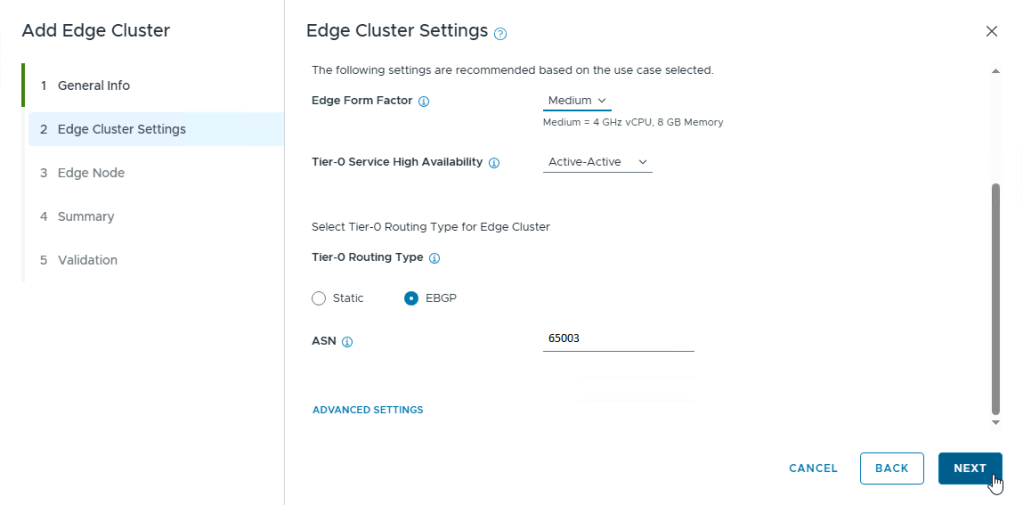
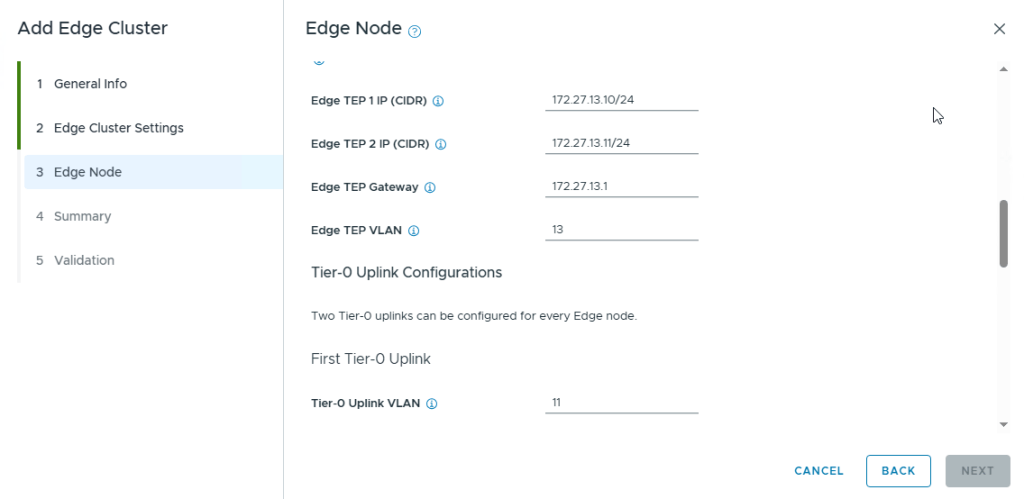
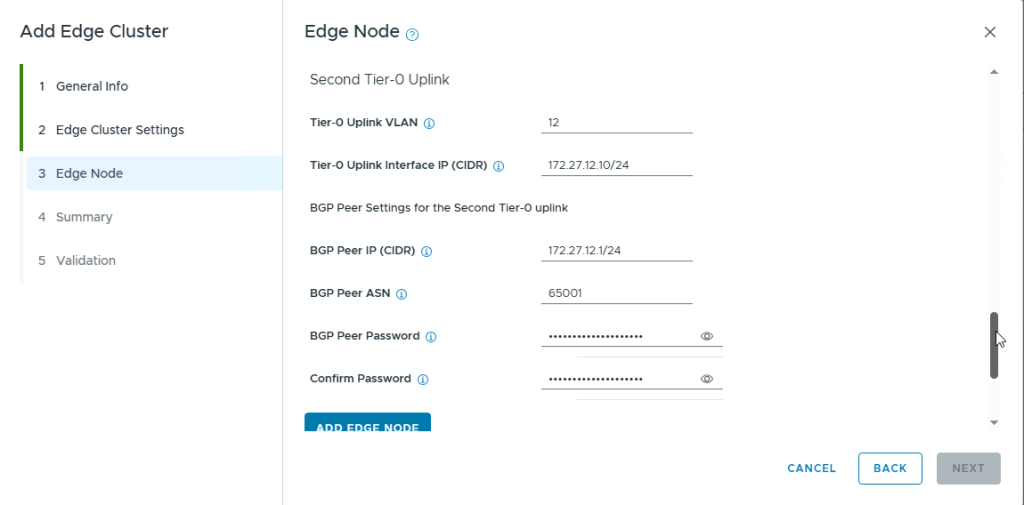
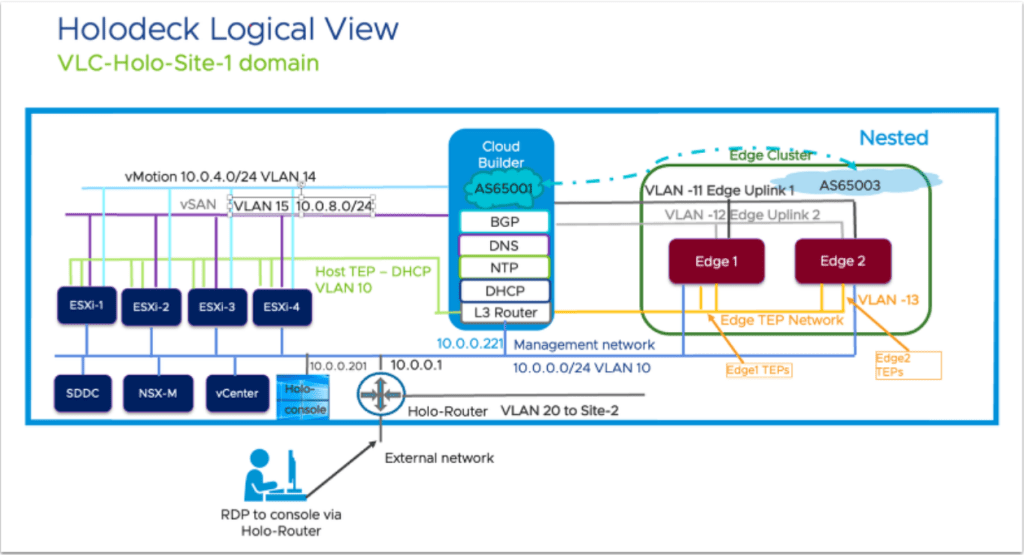
Clicking on Add Edge Cluster will pop another windowClick on Select All option and click Begin to start the processProvide the Cluster Name, MTU Size, Tier-0,1 Router Names, The Edge Cluster Profile Type is set to Default, provide the root passwords and credentials and click NextSelect the option ‘Custom’ under Edge Cluster Settings so that you can change the Edge Form Factor of the Edges (I used Medium in my lab), Select the HA option and scroll down to select the Routing typeSelect the option EBGP as we are going to use the BGP routing protocol in this Lab as that is how holodeck was designed. Use the ASN as 65003 as NSX Edges will always be in this ASN according to the architecture diagramNote the ASN of the NSX Edge Cluster and its BGP Neighbors (Cloud Builder acts as BGP Neighbor) here.Next, we provide the Edge Node detailsIn the VM Management Portgroup Name, you can give the portgroup name which you want the SDDC Manager to create as it will create the portgroup, or you can use existing VM management portgroup which was already created when we created the workload domain. If you want to use the existing portgroup, just click on the option “USE ESXI MANAGEMENT VMK’S VLAN” which is also VLAN 10 and then provide the EDGE TEP detailsEdge-1 TEP Details as per the holodeck architectureFirst Tier-0 Uplink detailsSecond Tier-0 Uplink detailsOnce you have provided all the details for Edge Node 1, click on Add Edge Node option
Perform the same steps to add the Edge Node 2 as well but with its own IP Addresses
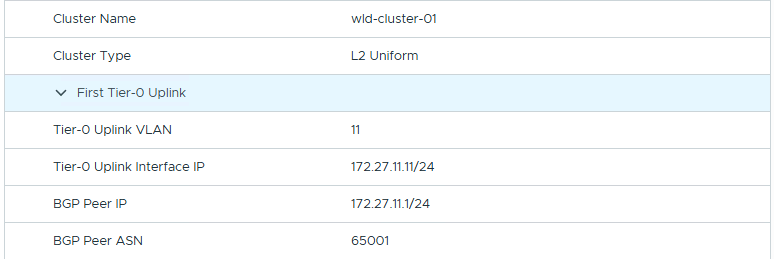
Two Edge Nodes have been AddedSummary Screenshot 1Summary Screenshot 2Summary Screenshot 3Summary Screenshot 4Summary Screenshot 5Summary Screenshot 6Summary Screenshot 7 – Click Next for Validation of the Edges ConfigurationNSX Edge Cluster and its Validation
Once everything is Validated with no errors, it will start the Deployment of the Edge Cluster with Edges in the workload vcenter
Edge Cluster ProgressCompletion of the NSX Edge Cluster in SDDC ManagerVerification of the NSX Edge Cluster with its Edges under the workload domain in SDDC Manager
This Concludes this post on how to deploy NSX Edge Cluster with 2 Edges in the Workload Domain using SDDC Manager
I have encountered an issue while deploying the NSX Edge Cluster in the workload domain in Holodeck and that is while it was trying the NSX BGP Peering Verification from the SDDC Manager and the BGP Neighbors were down. This was not provided in any documentation and I have documented about this issue and its resolution in this post.
I have attended this session in Explore 2024 Las Vegas and here is what I have learnt from this session in regards to architecting Microsoft SQL Server in the vSphere Environment. Even though the session heading shows that it is about VCF ( VMware Cloud Foundation), the reality is that these suggestions and recommendations are for vSphere. VCF is a combination of vSphere, VSAN, NSX and Aria Suite.
NOTE: I know its already close to VMware Explore 2025 but I found these on my phone from last year’s Explore and wanted to Post before I totally forget about these options in regards to SQL Server and its Performance on vSphere.
Below are few of the improvements to be made to the SQL Server VMs and VMware Best Practices (As shown in Explore 2024)
NUMA: Recommended VCPU Configuration
Here are the optimal numbers for vCPU per SQL Server VM
Storage Best Practices
Here are the Storage Best Practices for a SQL Server VM on VSAN Storage and VMFS Storage
Best Practices for VM Disk Layout
VM Disk Layout example
Network Best Practices
These are the network best practices and I have seen much better network performance with VMXNET3 NIC on SQL Server 2016 and up Servers (VMs)
SQL Server High Availability Options
HA Options for SQL Server, I would strongly advice against using RDM disks on the SQL Server VMHA Options Example on a SQL Server VM
Power Management of the VMs
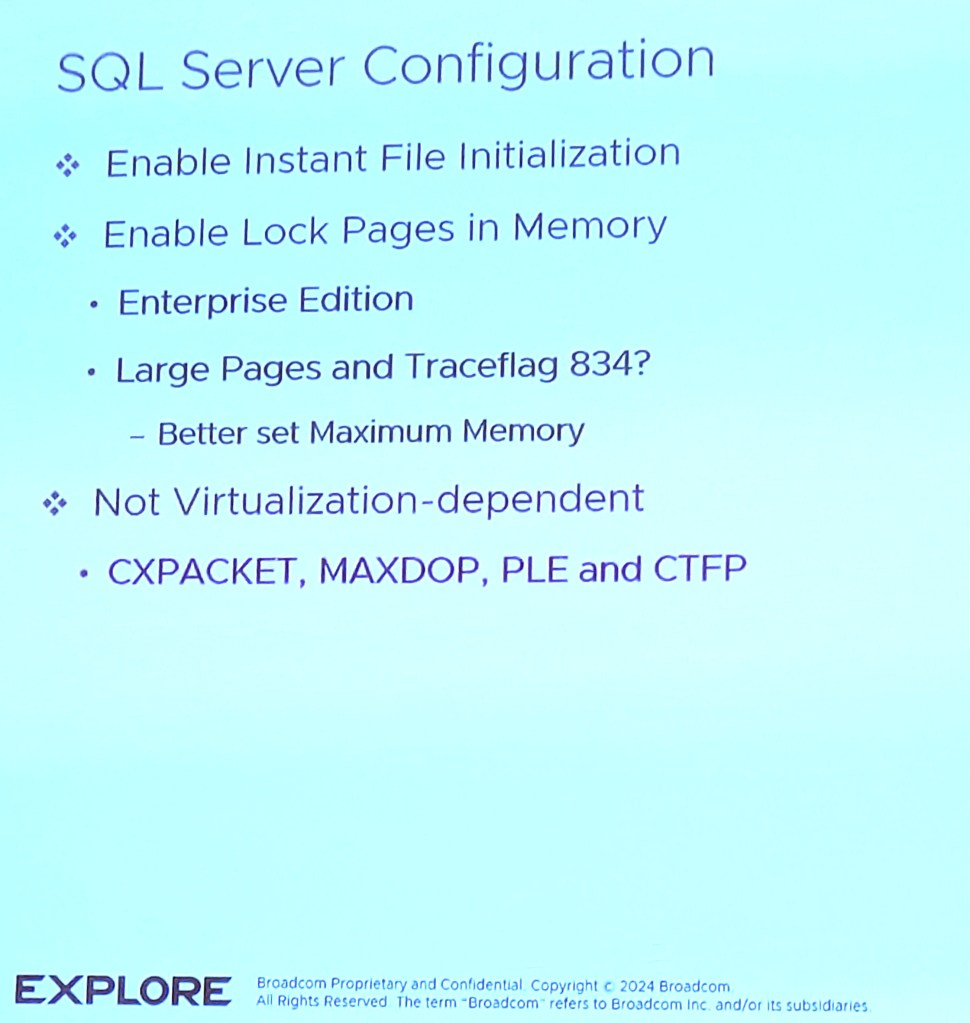
SQL Server Configuration
This is the SQL Server Configuration (few of the best practices)
SQL Server High Availability
Windows RSS Options
I personally haven’t seen the RSS options in the windows server configured but these are the options which could help.
In this post, I will be going over how to deploy a workload domain in the holodeck lab if you have only deployed the management domain with NSX Edge Cluster configured in it by using VLC GUI
In my lab, I was unsuccessful the first try in getting VLC GUI to deploy the workload management with NSX Edge Cluster in it, so I only deployed the management domain and then configured the workload domain using the SDDC Manager.
First, you will have to use “add_4_big_hosts_ESXi5-8.json” or “add_4_hosts_ESXi5-8.json” using the VLC GUI to provision 4 nested esxi hosts esxi5-esxi8 in the lab env.
Once the hosts are created, you will have to use the commission hosts option under Hosts in SDDC Manager to get the 4 esxi hosts into the SDDC Manager. Once the 4 esxi hosts are unassigned in the SDDC Manager, we will start the creation of the workload domain using the SDDC Manager.
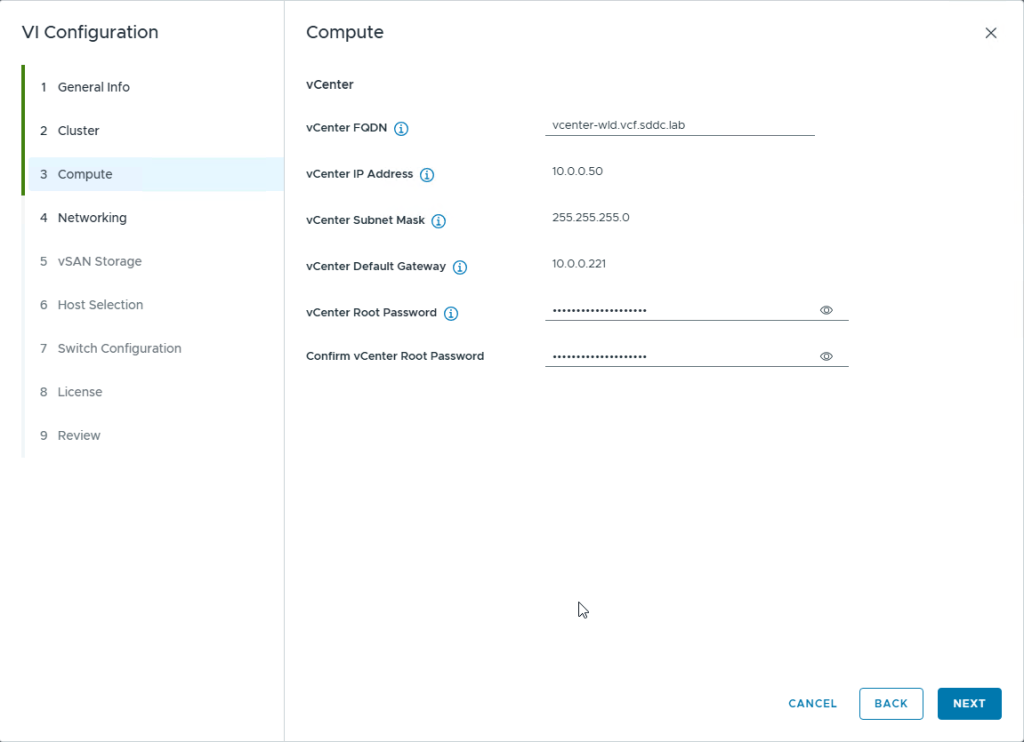
Click on Workload Domains option on the left side, then click on the Workload Domain dropdown option and select the option VI-Workload Domain to start the workload domain creationEnter the information like the domain name, organization name etc and select the SSO domain name, in my case, I selected the option “Join Management SSO Domain”provide the cluster name and click nextProvide the details of the vcenter server to be deployed. These details should already be present in the Holo-Console under C:\VLC\VLC-Holo-Site-1\conf in the “additional_DNS_Entries.txt” fileProvide the network details to deploy the NSX Manager appliance and its Cluster IP.
NOTE: The SDDC Manager will only deploy 1 NSX Manager Appliance nsx1-wld even though you provide the network details for all 3 managers
Provide the NSX Credentials as present in the Holodeck Console VM and click Next to continueSelect the amount of failures to tolerate for the VSAN Storage (I have deployed VSAN OSA in this lab), I have also selected VSAN Dedup and Compression for the vsan datastoreselect the esxi hosts (esxi-5 to esxi-8) and click NextUnder the Switch Configuration you can pick between these 3 options, but I picked the NSX Traffic Separation option as I wanted to have a separate dv switch for NSX trafficOnce you select the Switch Configuration Profile, You will need to select the VLAN for Management traffic, click on Edit as the screenshot aboveEnter the VLAN as VLAN 10 as this is the vlan used for Host TEP for DHCP and NSX Overlay according to the holodeck architecture diagram as shown belowClick on Acknowledge for the Next option to appear
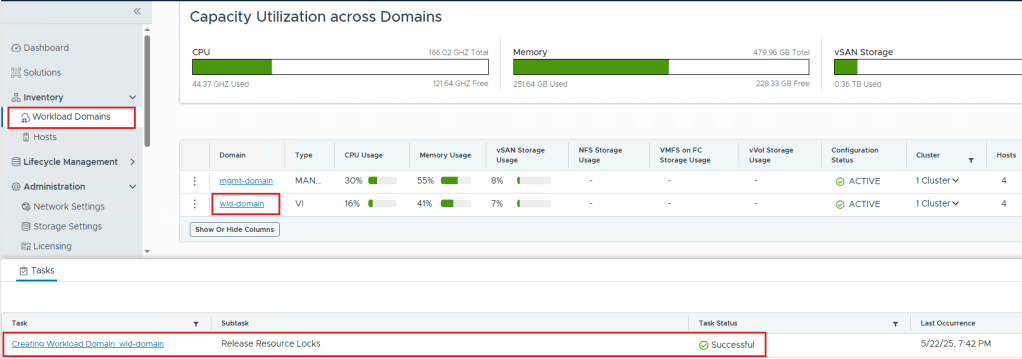
Click Next to ContinueClick on License Later as you can add the licenses later and continueCheck the Summary and click on Finish to Initiate the Workload Domain Creation in SDDC ManagerThis Shows that the workload domain was created and you can confirm that by checking the task as well as going to Workload Domains and checking the workload domain (in my lab the name is wld-domain) is active.



















 Hyperconverged Infrastructure & Virtualization